
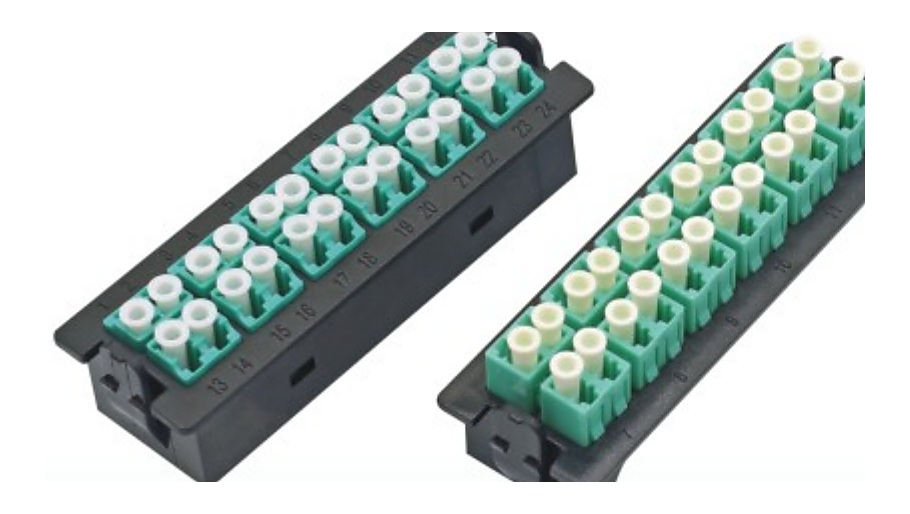
Start with the connection path, not an accessory bundle
ODF requests become hard to compare when one BOM line says only “panel with accessories.” An ODF patch panel supplier needs the buyer to distinguish the distribution frame or enclosure from the modules, cassettes, adapter interfaces, pigtails and splice-management items that belong to it.
Use a buyer line ID for each configuration that must be quoted separately. A parent-panel reference can show which items are intended to work together, but it should not replace the panel or accessory specifications. This makes a telecom room, FTTH distribution point, or high-density data-center connection path easier to review without asking a supplier to guess the design.
Build a five-part ODF line schedule
Questions that prevent incomplete panel quotations
Before sending the RFQ, confirm whether the buyer’s capacity means a panel-level requirement, a module-level requirement, or a combination of both. Record the mounting format and access direction with the panel line. Then identify which adapter, module or cassette interface is intended and whether pigtails or splice trays are required for the buyer’s connection path.
For high-density paths, attach the buyer’s module or port-map reference to the associated MTP/MPO cable assembly line. For an ODN distribution request, link the panel line to relevant fiber optic pigtail and fiber optic adapter lines instead of leaving them as unnamed accessories.
Common RFQ mistakes
- Listing an ODF capacity but omitting the adapter, module or cassette interface needed for the intended connection path.
- Using one accessory quantity for several unlike panels without stating which buyer line each accessory supports.
- Combining a pigtail or splice-tray request with a panel line when the connector, fiber or quantity needs separate review.
- Providing a module or cassette photo without a buyer line ID, current drawing or parent-panel reference.
- Giving a connected cable requirement without the endpoint or mapping reference that explains its relationship to the panel.
ODF patch panel RFQ checklist
Related sourcing paths
Use the ODF panel, module and cassette buying guide to sort the product roles before building a schedule. The earlier ODF change-control RFQ guide helps when the BOM changes between revisions. If the panel is part of an access-network BOM, add the relevant FTTH / ODN product sourcing lines so related passive components remain traceable.